In high-performance networking, speed and data integrity make all the difference. When meeting prospective clients, investors, or partners at conferences and meetings, manual business card entry is slow, error-prone, and leads to missed deals. Evrycard transforms physical interactions into instant CRM pipeline velocity.
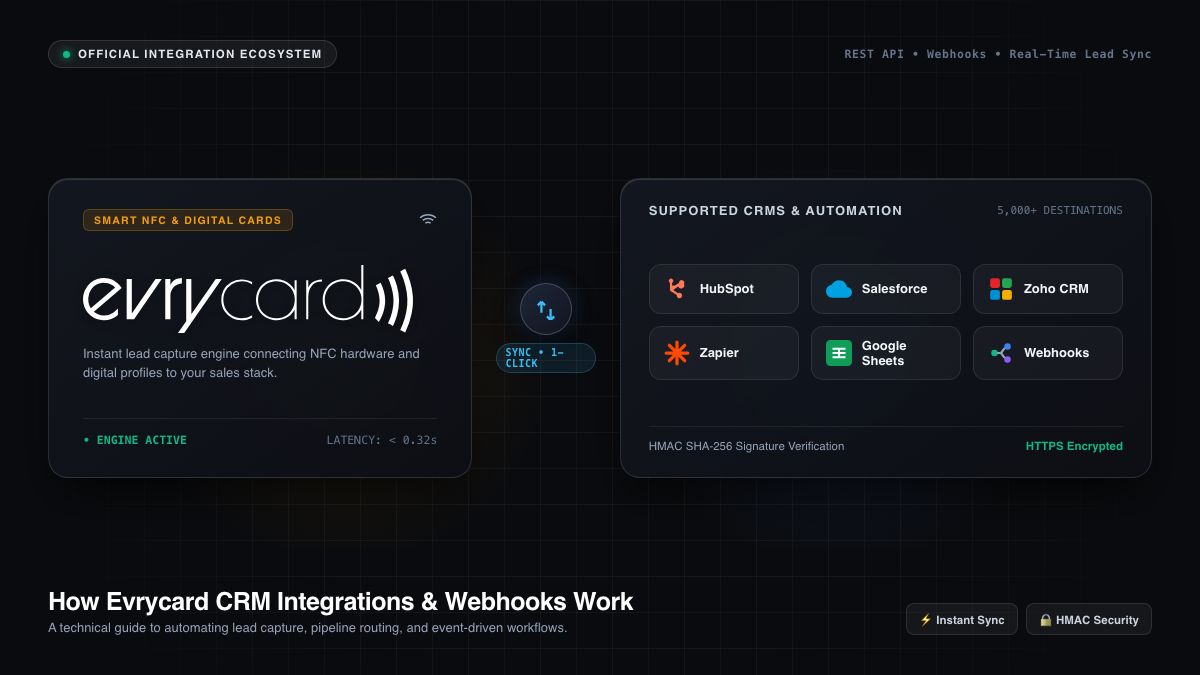
Every time you tap an Evrycard NFC business card, share your digital QR code, or exchange contacts via an online profile, Evrycard’s built-in 1-Click Sync Engine dispatches normalized lead data to your CRM and marketing stack within 0.32 seconds. Simultaneously, every contact form submission triggers an automatic, branded email to the recipient with a 1-click button to save your digital business card directly to their phone’s address book.
In this guide, we break down the underlying architecture, security protocols, supported field types, and step-by-step setup instructions for every supported integration and custom HTTPS webhook.
1. How the Evrycard Integration Engine Works
Evrycard’s integration hub is built directly into the core platform without requiring expensive third-party middleware. When a contact is captured via an NFC tap or digital profile, the system executes an automated workflow:
- Capture Event: A prospect taps your Evrycard NFC card or scans your dynamic QR code and submits their contact details (or exchanges their card).
- 1-Click Contact Email Dispatch: The system immediately dispatches an automated, mobile-optimized email to the prospect containing your full contact profile, social links, profile photo, and a 1-Click “Save Contact” (.vcf) button compatible with Apple Contacts, Google Contacts, and Microsoft Outlook.
- Payload Normalization & Sanitization: The engine structures raw input into a standardized schema, validating email formats, international E.164 phone numbers, and cleaning string fields.
- AES-256 Encrypted Handshake: Using securely stored credentials encrypted via AES-256-CBC, Evrycard establishes an authenticated HTTPS handshake with your target CRM or webhook endpoint.
- Parallel Cloud Sync & Failover Queue: Leads are delivered in parallel (e.g., Salesforce + Google Sheets + Slack simultaneously). If an external API is temporarily unreachable, Evrycard automatically enqueues the lead for background retry.
Email Your Info
2. Complete Data Dictionary & Supported Field Types
Evrycard captures rich, actionable contact profiles. Custom field mapping allows you to route standard and custom properties directly into specific fields in your CRM pipeline:
| Field Key | Type | Description & Mapping |
|---|---|---|
full_name |
String | Full contact name (e.g., “Sophia Vance”) |
first_name / last_name |
String | Automatically split names for CRM lead fields |
email |
Primary business or personal email address | |
phone |
Phone (E.164) | Primary telephone or mobile number |
mobile / telephone |
Phone | Secondary / alternate phone numbers or direct office line |
company |
String | Organization or company name |
job_title |
String | Job title or position (e.g., “Head of Partnerships”) |
website |
URL | Corporate or personal website URL |
address |
String | Office or business postal address |
message |
Text / Notes | Meeting notes, conversation context, or custom inquiry message |
tags |
Array / String | Contextual event tags (e.g., “London Tech Week”, “VIP Booth”) |
card_name |
String | The specific Evrycard profile or team card used during the exchange |
team |
String | Assigned enterprise team or department (e.g., “UK Sales Team”) |
avatar_url |
URL | Direct link to the prospect’s uploaded profile picture or portrait photo |
custom_fields |
JSON Object | Custom form fields (e.g., Budget, Buying Timeline, Company Size) |
source |
String | Capture channel: nfc_card, qr_code, or profile_share |
submitted_at |
ISO 8601 UTC | Timestamp of interaction in UTC (e.g., 2026-09-14T10:20:00Z) |
3. Native CRM & Automation Platform Integrations
Evrycard supports zero-code, one-click native connections to the industry’s leading enterprise platforms:
1. Salesforce (Sales Cloud & Pardot)
Use Case: Enterprise sales teams requiring automatic Lead and Contact creation with deduplication rules.
- Authentication: OAuth 2.0 connected app.
- Data Flow: Real-time REST API call to
/services/data/v59.0/sobjects/Lead. Matches existing records via email before creating a new Lead. - Setup: In Evrycard, click Connect Salesforce. Log into your Salesforce instance, approve API permissions (
apiandrefresh_token), and select your target lead record type.
2. HubSpot (OAuth & Private App Token)
Use Case: Inbound marketing and sales pipelines looking for deal creation and automated lifecycle tracking.
- Authentication: 1-Click OAuth or HubSpot Private App Access Token with
crm.objects.contacts.writeandcrm.objects.contacts.readscopes. - Data Flow: Creates or updates a HubSpot Contact record, attaches meeting notes, applies tags, and optionally creates a sales Deal in your pipeline.
- Setup: In HubSpot, generate a Private App token under Settings → Integrations → Private Apps, or click 1-Click Connect in your Evrycard dashboard.
3. Google Sheets (Instant Webhook & 1-Click OAuth)
Use Case: Real-time shared team lead tracker and lightweight CRM.
- Authentication: 1-Click Google OAuth (automatically creates an “Evrycard Leads” spreadsheet) or Google Apps Script Web App Webhook URL.
- Data Flow: Appends a formatted row containing Timestamp, Card Name, Lead Name, Email, Phone, Company, Job Title, Notes, and Source in real-time.
4. Microsoft Dynamics 365 & Dataverse
Use Case: Corporate and enterprise environments leveraging the Microsoft 365 ecosystem.
- Authentication: Microsoft Online OAuth 2.0 or Organization Environment URL.
- Data Flow: Dispatches leads directly into Microsoft Dataverse / Dynamics 365 Sales Lead entities via the Dynamics Web API.
5. Pipedrive
Use Case: Activity-focused sales teams managing fast-moving pipelines.
- Authentication: 1-Click OAuth or Personal API Token + Company Subdomain.
- Data Flow: Creates a new Person record, organization link, and a Deal in your selected pipeline stage with meeting notes attached.
6. Zoho CRM
Use Case: Global teams using Zoho’s unified business suite.
- Authentication: Server-based OAuth application supporting global data centers (
.com,.eu,.in,.com.au,.jp). - Data Flow: Inserts fresh Leads into Zoho CRM with automated assignment rules.
7. Slack (Sales Channel Alerts)
Use Case: Immediate team visibility and celebration whenever someone taps a card or submits a lead.
- Authentication: Slack Incoming Webhook URL.
- Data Flow: Posts an interactive, rich Slack notification card with the lead’s name, photo, company, phone, email, and one-click quick actions.
8. Zapier & Make (Integromat)
Use Case: Connecting Evrycard to over 5,000+ specialized apps, billing tools, databases, and custom workflows.
- Authentication: Catch Hook / Custom Webhook URL.
- Data Flow: Dispatches the complete JSON payload on every interaction to trigger multi-step automation scenarios.
9. Email Marketing Tools: ActiveCampaign, ConvertKit, Brevo & Klaviyo
Use Case: Nurturing prospects with automated welcome sequences, newsletters, and SMS follow-ups.
- Supported Platforms: ActiveCampaign (API Key + URL), ConvertKit (API Secret + Form ID), Brevo (API v3 Key), Klaviyo (Private API Key).
- Data Flow: Subscribes prospects directly to target email lists, applies event tags, and triggers automated drip campaigns.
4. Custom HTTPS Webhook API Documentation
For custom CRM architectures, ERP systems, internal databases, or serverless functions (AWS Lambda, Google Cloud Functions, Cloudflare Workers), Evrycard provides raw HTTPS webhooks.
Webhook Delivery Specifications
- HTTP Method:
POST - Content-Type:
application/json; charset=utf-8 - Security: HTTPS only with optional HMAC-SHA256 secret header verification (
X-Evrycard-Signature). - Timeout: 10.0 seconds.
- Expected Response: HTTP status code
200 OKor201 Created.
Sample Webhook JSON Payload
{
  "event": "lead.captured",
  "source": "Digital Business Card",
  "submitted_at": "2026-09-14T10:20:00Z",
  "card": {
    "name": "Sophia Vance",
    "card_title": "Executive NFC Profile",
    "team": "UK Partnerships"
  },
  "lead": {
    "full_name": "Alexander Wright",
    "first_name": "Alexander",
    "last_name": "Wright",
    "email": "[email protected]",
    "phone": "+44 20 7183 4450",
    "mobile": "+44 7700 900123",
    "company": "Apex Capital Group",
    "job_title": "Managing Director",
    "website": "https://apexcapital.co.uk",
    "address": "100 Bishopsgate, London EC2N 4AG",
    "message": "Discussing enterprise NFC rollout for 250 employees at London Tech Week.",
    "tags": ["London Tech Week", "Enterprise Tier", "NFC Tap"],
    "avatar_url": "https://images.unsplash.com/photo-1560250097-0b93528c311a?w=400"
  },
  "custom_fields": {
    "team_size": "200-500",
    "timeline": "Q4 2026",
    "hardware_model": "Custom Matte Black Metal NFC"
  }
}
5. Security & Enterprise Compliance
Evrycard is designed with security-first architecture for UK and global enterprises:
- End-to-End Encryption: All third-party OAuth access tokens and API keys are encrypted at rest using industry-standard
AES-256-CBCwith dedicated initialization vectors (IVs). - GDPR & UK DPA Compliance: Lead data is processed securely with full support for data erasure, consent logs, and audit trails.
- Zero Unencrypted Logs: Sensitive API tokens and credentials are excluded from runtime error logs and telemetry.
Getting Started with Evrycard Integrations
Ready to automate your team’s networking? To connect your CRM or configure custom webhooks:
- Log into your Evrycard Dashboard.
- Navigate to Integrations in the sidebar.
- Select your preferred CRM (Salesforce, HubSpot, Google Sheets, etc.) or choose Custom Webhook.
- Click Connect, follow the authentication prompt, and run a test lead to verify your connection!
Discover how an Evrycard digital business cards for teams empowers your networking.
Discover how an Evrycard online business card empowers your networking.